Epson L3550: A Compact Wi-Fi Ink Tank Printer for Home and Study
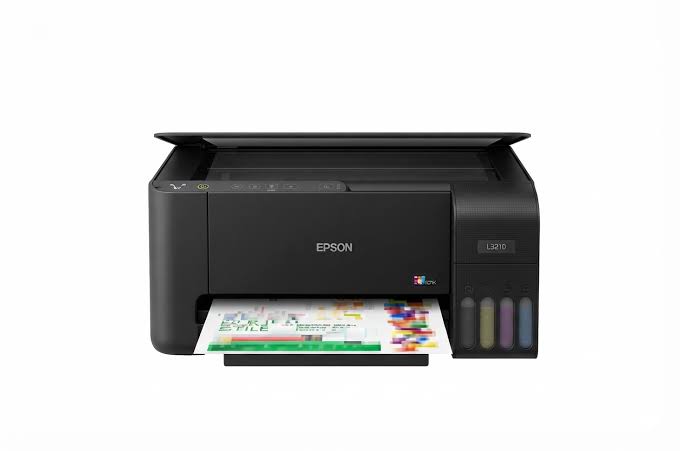
A home printer works hardest at the wrong moments: the night before an assignment is due, when a school project needs ten coloured pages, or when a small business owner needs flyers printed before morning. Cartridges tend to run out right then. The Epson L3550 takes that worry away. It’s a compact 3-in-1 that prints, scans and copies over Wi-Fi, and it runs on refillable ink tanks instead of cartridges, so every page costs less.
Built for Low-Cost Printing
The L3550 uses Epson’s EcoTank system, which replaces cartridges with large refillable tanks. Epson says the bundled ink prints up to 6,600 pages in black and 5,900 in colour, which it equates to up to 79 cartridges’ worth from one set. Epson also claims savings of up to 90% on ink costs compared with cartridge printers.
Refilling is simple. The key-lock bottles only fit the matching tank, and the tanks sit on the front of the printer, so you can see ink levels at a glance. The box includes four 65 ml bottles (black, cyan, magenta, yellow) plus an extra black bottle. Yields are Epson’s extrapolated figures, and some ink is used to prime the printhead at setup, so real-world results will vary. When you reorder, check the bottle series printed on your carton.
Faster Than Entry-Level Models
The L3550 is a step up from basic EcoTank printers thanks to the PrecisionCore printhead. Epson rates it at 15 ipm in black and 8 ipm in colour (ISO), with the first black page out in about 9 seconds and the first colour page in about 15. Resolution reaches 4,800 x 1,200 dpi. Colours come from dye inks, which suit vivid school projects and photos, and the printhead is heat-free, which keeps power use low. You can read more on Epson’s Heat-Free Technology page.
Borderless printing goes up to 10 x 15 cm, which suits snapshots and small prints. The paper list includes A4, A5, A6, B5, B6, 10 x 15 cm, 13 x 18 cm, 9 x 13 cm and envelopes, and the tray holds 100 sheets.
Wi-Fi, Wi-Fi Direct and Your Phone
The L3550 connects by USB, Wi-Fi and Wi-Fi Direct, so you can print from a phone even without a router. Epson lists support for Apple AirPrint and the free Epson Smart Panel app. The app handles setup, printing, scanning and checking ink levels from your phone. Check Epson’s compatibility list before installing. Epson Connect adds Email Print and a Remote Print Driver, so you can send a document to the printer from anywhere.
Windows 11 and macOS 11 or later are supported. Drivers are in Epson’s download centre, and the setup guide takes you through installation step by step.
Compact and Quiet Enough for Home
The L3550 measures 375 x 347 x 179 mm, so it fits on a shelf or a small desk. In sleep mode it draws just 5.4 W. Epson recommends it for one or two users, which makes it a good match for a family, a student or a one-person home office.
Specifications at a Glance
| Feature |
Epson L3550 |
| Functions |
Print, scan, copy |
| Printhead |
PrecisionCore, heat-free |
| Ink |
Dye, 4-colour |
| Max resolution |
4,800 x 1,200 dpi |
| Speed (ISO) |
15 ipm black / 8 ipm colour |
| First page out |
About 9 sec black / 15 sec colour |
| Duplex |
Manual |
| Paper tray |
100 sheets |
| Borderless |
Up to 10 x 15 cm |
| Scanner |
Flatbed CIS, up to 1,200 x 2,400 dpi |
| Connectivity |
USB, Wi-Fi, Wi-Fi Direct |
| Mobile |
AirPrint, Epson Smart Panel, Epson Connect |
| Bundled ink yield |
Up to 6,600 black / 5,900 colour pages |
| Size |
375 x 347 x 179 mm |
| Power |
AC 220-240V |
Who the Epson L3550 Is For
It suits students, families and home offices that print a steady stream of assignments, forms and school projects. It’s also a good fit for small shops and freelancers who print the occasional invoice, flyer or ID copy and want low running costs without paying for office features they don’t need.
What It Doesn’t Do
The L3550 has no automatic document feeder, so multi-page scans and copies go through the glass one page at a time. Duplex printing is manual, there’s no fax, and there’s no Ethernet port, so it connects by Wi-Fi or USB only. The control panel has no screen, so you set up and manage it from your phone or computer. If you scan stacks of documents or share one printer across a busy office, look at a model with a feeder and Ethernet.
Common Questions
Does the Epson L3550 scan and copy? Yes. It’s a 3-in-1 that prints, scans and copies.
Does it print double-sided automatically? No, duplex is manual.
Can I print from my phone? Yes, through Epson Smart Panel or AirPrint, and Wi-Fi Direct works without a router.
Does it have an ADF or fax? No.
Final Verdict
The Epson L3550 keeps what makes EcoTank great, low page costs and mess-free refills, and adds faster PrecisionCore printing in a compact body. For a student, a family or a small home business, it’s an affordable way to print without worrying about cartridges.



 Boda delivery







Reviews
Clear filtersThere are no reviews yet.