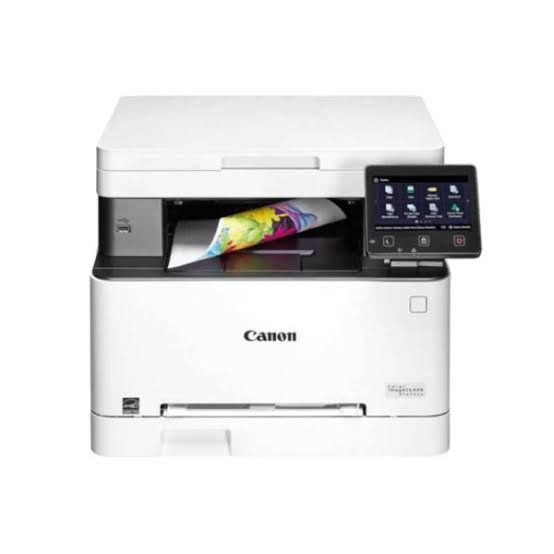
Canon i-SENSYS MF651Cw Printer: 3-in-1 Colour Laser
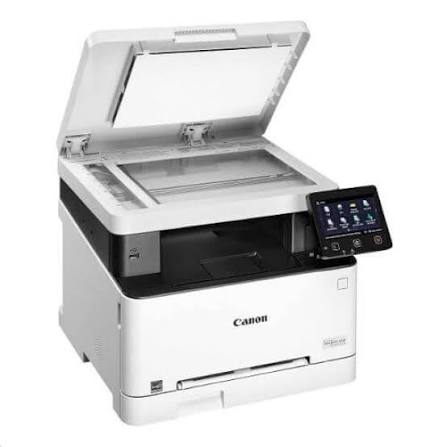
The Canon i-SENSYS MF651Cw Printer brings colour laser printing, copying, and scanning into one compact A4 device. Small offices need dependable output without desk clutter, so this model delivers exactly that. Moreover, it connects through Wi-Fi, Ethernet, USB, and popular mobile apps. As a result, teams print from almost any device in the room. If you compare office Printers, this all-in-one deserves a close look.
Canon designed the MF651Cw for small and medium businesses and remote professionals. Therefore, it balances speed, quality, and simple controls. Furthermore, a large touchscreen puts every function within easy reach.
Canon i-SENSYS MF651Cw Printer Speed and Responsiveness
This machine prints up to 18 pages per minute on A4 paper. Therefore, busy teams clear their print queues quickly. Additionally, it handles A5 landscape pages at up to 38 pages per minute. Consequently, short notices and flyers finish in seconds.
Waiting time stays short as well. The unit warms up in about 13 seconds from power on. Furthermore, the first colour page arrives in roughly 10.5 seconds. The first mono page follows in about 10.4 seconds. Hence, quick jobs never stall your day.
Copying moves just as briskly. For example, the first colour copy from the platen appears in about 13.4 seconds. Meanwhile, the first mono copy takes about 11.4 seconds.
Sharp Output for Everyday Documents
The printer reaches resolutions of up to 1200 x 1200 dpi. As a result, text looks crisp and small fonts stay legible. Moreover, colour charts and logos show clean edges. Additionally, toner saver mode trims toner use for internal drafts. Therefore, you can reserve full quality for client-facing pages.
The device supports UFRII and includes 45 PCL fonts. Besides that, it keeps a 5 mm print margin on every side. Envelopes use a 10 mm margin instead.
Connectivity That Adapts to Every Workspace
Flexible connections set this model apart. First, USB 2.0 Hi-Speed supports direct computer links. Second, Gigabit Ethernet serves shared office networks. Third, Wi-Fi and wireless direct connection remove cable limits. Consequently, you can place the device wherever your team needs it.
A stable network matters for shared devices. For that reason, many offices pair this model with dependable Networking products. Together, they deliver smooth, predictable printing for every user.
Canon i-SENSYS MF651Cw Printer Mobile and Cloud Printing
Mobile printing works without extra hardware. For instance, iPhone and iPad users print through AirPrint. Likewise, Android users print through the Mopria standard. Furthermore, the Canon PRINT Business app adds extra control on both platforms. The Canon Print Service Plug-in also supports Android devices.
Cloud access saves extra steps. In addition, the touchscreen connects to Google Drive, Dropbox, and OneDrive. As a result, you print PDF and JPEG files straight from cloud folders. Similarly, you scan documents and send them back to the cloud.
Smart Controls for Busy Teams
The 12.7 cm touchscreen simplifies every task. For instance, users tap an icon to copy, scan, or print. Moreover, the interface looks familiar to anyone who uses a smartphone. As a result, new staff learn the controls quickly.
The application library adds more convenience. Additionally, it stores saved forms for instant printing. Likewise, scan to email shortcuts reduce repeated steps. Consequently, teams complete paperwork faster each day.
Document security deserves attention in shared spaces. Therefore, the PIN-protected Secure Print feature holds jobs until the owner arrives. Furthermore, this habit keeps confidential pages out of the output tray.
Technical Specifications at a Glance
Print and Copy Performance
The MF651Cw is a colour laser all-in-one that prints, copies, and scans. It uses colour laser beam printing with single-sided output. Moreover, print speed reaches 18 ppm on A4 and 38 ppm on A5 landscape. Resolution climbs to 1200 x 1200 dpi. In addition, warm-up takes about 13 seconds from power on. First print-out takes 10.5 seconds in colour and 10.4 seconds in mono.
Copying reaches 18 ppm on A4 at up to 600 x 600 dpi. Furthermore, users make up to 999 copies per job. Reduction and enlargement run from 25 to 400 percent in 1 percent steps. Additionally, copy modes include Text/Photo/Map, Printed Image, and Text.
Scanning and Paper Handling
The colour scanner combines a platen with an automatic document feeder. Additionally, optical resolution reaches 600 x 600 dpi with 24-bit colour depth. TWAIN, WIA, and ICA drivers support popular scanning software. Users also scan through the MF Scan Utility or the Canon PRINT Business app.
The standard cassette holds 250 sheets. Besides that, a one-sheet manual feed slot handles special media. Therefore, letterhead and envelopes feed without disturbing the main tray.
Interface, Display, and Security
A 12.7 cm colour touchscreen controls every function. Moreover, the built-in application library stores frequent tasks such as saved forms and scan to email. Secure Print protects sensitive jobs with a PIN. Also, the device prints JPEG, TIFF, and PDF files from a USB memory key. Finally, the starter black cartridge yields 1,350 pages.
Readers can review Canon’s wider product range on the official Canon website. Meanwhile, the figures above reflect the manufacturer’s published specifications.
Canon i-SENSYS MF651Cw Printer Use Cases in Daily Work
Home Offices and Remote Professionals
Remote professionals need one dependable device. For example, a single unit handles invoices, contracts, and scanned receipts. Moreover, mobile printing lets you send files from a phone between calls. As a result, desk space and workflow both stay tidy.
In addition, the compact footprint suits shelves, desks, and spare rooms. Consequently, you can set up a small print station anywhere.
Small Businesses and Retail Counters
Small businesses print more than plain text. For instance, they produce menus, flyers, and branded forms in colour. Additionally, the application library speeds up repeated tasks. Consequently, front-desk staff finish routine jobs in a few taps.
Classrooms and Training Rooms
Teachers prepare worksheets and handouts every week. Therefore, quick colour output helps lessons look engaging. Furthermore, Secure Print keeps exam material private until the right person collects it. Likewise, trainers print certificates and agendas without leaving the room.
Clinics, Studios, and Professional Services
Professional offices handle many confidential documents. Hence, PIN-protected printing adds a practical layer of privacy. Meanwhile, the document feeder speeds up the digitising of paper files. Moreover, colour output helps studios share clear drafts with clients.
Canon i-SENSYS MF651Cw Printer Compatibility Overview
This model works with a broad mix of devices. First, TWAIN and WIA drivers serve Windows computers. Meanwhile, ICA support serves Mac computers. Therefore, mixed-platform offices share one device easily.
Wireless printing keeps mobile work simple. Whether you use ultrabooks or workstation Laptops, Wi-Fi removes cable clutter. Hence, hybrid workers print from any seat. Apple devices rely on AirPrint, while Android devices use Mopria. Additionally, the Canon PRINT Business app supports both ecosystems.
Cloud services also integrate directly. For example, Google Drive, Dropbox, and OneDrive work from the touchscreen. Furthermore, USB memory keys let you print without a computer.
Quality Standards Behind Every Unit
Quality standards matter when you choose office equipment. Therefore, we source every unit carefully through trusted channels. Aiconic Computers stands behind product quality fully. As a result, the MF651Cw reaches you in dependable condition. Moreover, its colour laser engine, scanner, and touchscreen reflect Canon’s manufacturing standards. Additionally, we ensure customers receive their products promptly. Consequently, your team starts printing, copying, and scanning without delay.




 Boda delivery







Reviews
Clear filtersThere are no reviews yet.