Canon i-SENSYS MF754Cdw Printer
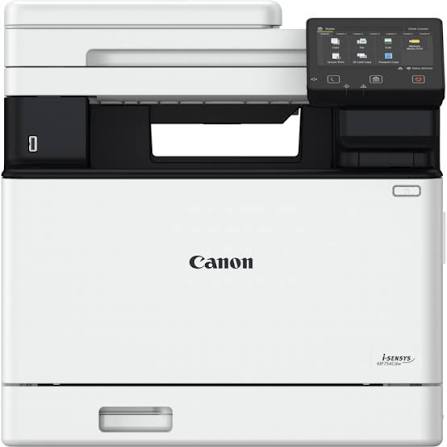
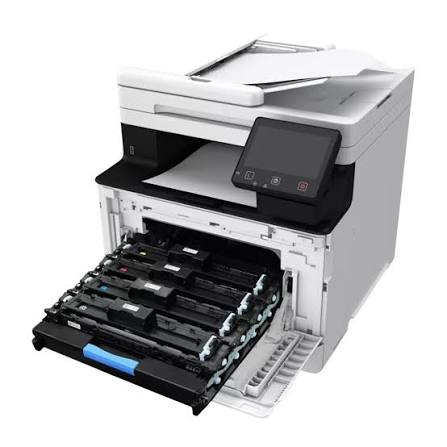
The Canon i-SENSYS MF754Cdw Printer is a 4-in-1 colour laser that prints, copies, scans, and faxes. Busy offices need one dependable machine for every document task. Moreover, it prints at up to 33 pages per minute on A4. As a result, queues clear quickly and teams stay productive. If you compare office Printers, this model sets a strong benchmark.
Canon built this model for small offices and retail counters. Therefore, it combines speed, security, and flexible connectivity in one chassis. Furthermore, a 5-inch colour touchscreen makes every function easy to find.
Canon i-SENSYS MF754Cdw Printer Productivity Engine
Speed defines daily comfort in a shared office. Therefore, this machine delivers 33 pages per minute on A4 paper. Additionally, the first page appears in about 7.1 seconds. Consequently, urgent single pages never feel like a chore.
Warm-up takes about 14 seconds from power on. Meanwhile, the toner saver mode trims consumption on internal drafts. Hence, you can match output quality to each task.
Duplex Output That Saves Paper
The letter d in the model name signals automatic duplex printing. Therefore, double-sided reports come out without manual page flipping. Furthermore, this feature cuts paper use across long documents. As a result, finished packs look neat and travel easily.
Colour Output That Elevates Business Documents
Resolution reaches up to 1200 x 1200 dpi. As a result, small text stays readable and logos stay crisp. Moreover, charts and presentations carry vivid, professional colour. Therefore, client proposals look polished straight from the tray. Additionally, envelopes print with a 10 mm margin. Standard pages keep a 5 mm margin on every side.
Canon i-SENSYS MF754Cdw Printer Language and Font Support
Print language support suits varied workplace systems. For instance, the device handles UFRII, PCL 5c, PCL6, and Adobe PostScript. Moreover, it includes 45 PCL fonts and 136 PostScript fonts. Consequently, documents keep their intended layout across applications. Likewise, design and finance teams avoid awkward formatting surprises.
Security Features for Shared Offices
Shared printers raise real privacy concerns. Therefore, Secure Print holds jobs until the owner authenticates. Furthermore, Encrypted Secure Print protects data while it travels to the device. As a result, confidential pages stay out of the wrong hands. Additionally, Microsoft Universal Print support fits modern cloud-managed environments.
Connectivity and Cloud Workflows
Built-in wireless networking joins wired options for flexible placement. Therefore, you position the machine where staff need it most. In addition, strong office networks rely on dependable Networking products. Together, they keep print jobs moving smoothly for every user.
A front-panel USB port adds quick standalone access. For example, you print JPEG, TIFF, or PDF files from a memory key. Likewise, you scan documents straight to the same drive. Furthermore, cloud printing supports Dropbox, Google Drive, and OneDrive for PDF and JPEG files.
Mobile Printing Options
Mobile printing covers both major phone platforms. For instance, iPhone and iPad users print through AirPrint. Meanwhile, Android users rely on Mopria certification and the Canon Print Service Plug-in. Additionally, the Canon PRINT Business app adds control from any handheld device.
Touchscreen Controls That Reduce Training Time
The 5-inch colour touchscreen anchors daily operation. Moreover, its layout feels familiar to smartphone users. As a result, new employees learn tasks without lengthy briefings. Additionally, you can customise shortcuts for repeated jobs. Consequently, scanning, copying, and faxing take fewer taps.
Standalone operation matters as well. For instance, staff can scan to a memory key without touching a computer. Therefore, quick tasks no longer depend on a nearby workstation.
Technical Specifications
Print and Copy Performance
This model is a colour laser all-in-one with print, copy, scan, and fax functions. It uses colour laser beam printing at up to 1200 x 1200 dpi. Moreover, print speed reaches 33 ppm on A4 paper. Warm-up takes about 14 seconds or less. In addition, first print-out takes about 7.1 seconds in colour and mono.
Copying also reaches up to 33 ppm on single-sided A4 pages. Furthermore, supported languages include UFRII, PCL 5c, PCL6, and Adobe PostScript. Fonts total 45 PCL and 136 PostScript options. Toner saver mode remains available for routine drafts.
Scan, Fax, and Interface
Scanning runs through the MF Scan Utility or the Canon PRINT Business app. Additionally, the 5-inch colour touchscreen is customisable. Therefore, teams can place frequent tasks on the home screen. Moreover, a front-panel USB port handles memory keys. Advanced features include Encrypted Secure Print and Microsoft Universal Print support.
Capacity, Duty Cycle, and Build
Canon recommends 750 to 4,500 pages per month. However, the maximum duty cycle reaches 50,000 pages monthly. Therefore, the device handles occasional surges without strain. The unit weighs about 23.6 kg. Consequently, you should choose a sturdy desk or counter. Wide paper size options also support varied stationery needs.
Readers can explore Canon’s wider range on the official Canon website. Meanwhile, these figures reflect published manufacturer details.
Canon i-SENSYS MF754Cdw Printer Use Cases Across Industries
Small and Growing Offices
Growing offices need equipment that scales with demand. Therefore, the generous duty cycle supports rising print volumes. Additionally, shared access means one device serves many desks. Consequently, teams avoid cluttering rooms with personal printers.
Retail Counters and Service Desks
Retail counters print receipts, forms, and order sheets daily. Moreover, the compact footprint suits a shelf or counter surface. Meanwhile, the fax function supports older supplier workflows. Hence, front-desk staff manage mixed paperwork in one place.
Professional Practices
Clinics, law firms, and accountants handle sensitive records. Therefore, encrypted secure print adds meaningful protection. Furthermore, scan to cloud destinations speeds up digital archiving. Likewise, front-panel USB access simplifies quick file transfers.
Marketing and Design Teams
Marketing teams review colour proofs before final production. Consequently, accurate colour and PostScript support reduce reprint cycles. Additionally, Canon’s free web-based PosterArtist app helps create posters quickly.
Canon i-SENSYS MF754Cdw Printer Compatibility Guide
Compatibility spans phones, tablets, and computers. First, AirPrint serves Apple devices without extra drivers. Second, Mopria and the Canon Print Service Plug-in serve Android devices. Third, Microsoft Universal Print integrates with managed Windows environments. Therefore, mixed-device offices share one printer comfortably.
Computers connect through wired or wireless links. For example, office Desktops join the printer through standard network connections. Moreover, cloud services such as Dropbox and OneDrive support direct printing. Likewise, USB memory keys remove the need for any computer.
Reliable Performance for Steady Workloads
Consistent output matters more than peak speed alone. Therefore, this machine pairs a high duty cycle with steady throughput. Furthermore, toner saver mode extends consumables across routine jobs. Meanwhile, sturdy construction supports a permanent place in the office. Overall, the design favours dependable daily service.
Standards That Earn Customer Trust
Quality standards matter when you choose a shared office printer. Therefore, we source each unit carefully through trusted channels. Aiconic Computers stands behind product quality fully. As a result, the MF754Cdw reaches you in dependable condition. Moreover, its print engine, scanner, and touchscreen reflect Canon’s manufacturing standards. Additionally, we ensure customers receive their products promptly. Consequently, your team starts printing, copying, scanning, and faxing without delay.




 Boda delivery

 Boda delivery
 Countrywide delivery
 Warranty 1 year
 Free 48 Hrs Returns




Reviews
Clear filtersThere are no reviews yet.