Canon CanoScan LiDE 300
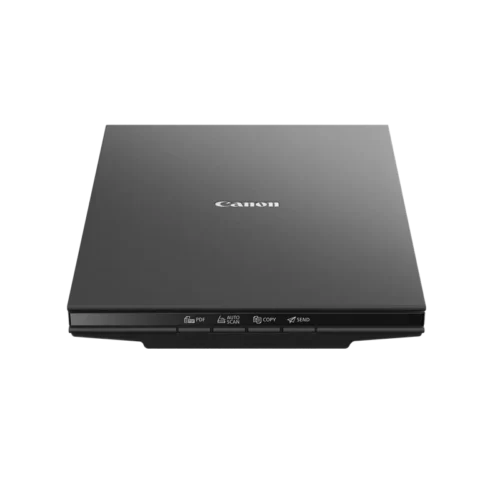
The Canon CanoScan LiDE 300 is a slim A4 flatbed scanner for photos, documents, and keepsakes. Its 2400 x 2400 dpi optical resolution captures fine detail with ease. Moreover, USB power removes the need for a separate adapter. As a result, you can scan at a desk, a kitchen table, or a shared workspace.
Canon designed this scanner for people who value simplicity. Therefore, four EZ buttons handle the most common tasks. Furthermore, Auto Scan chooses suitable settings without manual adjustment. Consequently, beginners and experts reach good results quickly.
Canon CanoScan LiDE 300 Scan Quality and Detail
Optical resolution reaches 2400 x 2400 dpi. Therefore, small text and fine photo textures stay clear. Additionally, selectable resolution spans 25 to 19200 dpi. As a result, you can match every scan to its purpose.
A contact image sensor captures each line with a three-colour RGB LED light source. Moreover, colour scans use 48-bit input for smooth gradients. Greyscale scans use 16-bit input and 8-bit output. Consequently, skin tones, skies, and shadows look natural.
Automatic Corrections for Cleaner Results
Auto Document Fix improves the readability of text pages. Likewise, Auto Photo Fix helps restore faded or uneven images. Therefore, old family prints regain life with little effort. Besides that, the corrections save time on manual editing.
Speed That Respects Your Time
An A4 colour scan at 300 dpi takes approximately 10 seconds. Meanwhile, a 4 x 6 inch photo at the same settings takes about 5 seconds. In addition, previews appear in roughly 9 seconds. Therefore, you can check alignment before committing to a full scan.
Large archives become manageable at this pace. For example, a stack of receipts clears in a single sitting. Likewise, an album of prints turns digital within an afternoon.
Simple Controls for Everyday Scanning
Four EZ buttons cover PDF, Auto Scan, Copy, and Send. Therefore, you press a button instead of searching through menus. Furthermore, Auto Scan recognises the item on the glass automatically. As a result, documents and photos receive suitable settings instantly.
PDF and Cloud Sharing
The PDF button creates shareable files in one press. Moreover, PDF is a format that opens reliably on most devices. Additionally, the scan to cloud feature supports quick online sharing. Consequently, colleagues and relatives receive documents without delay.
Slim Design with Simple USB Power
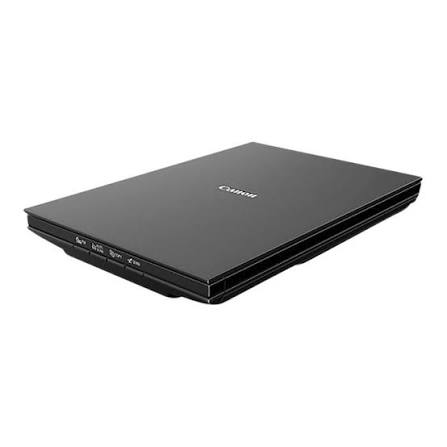
This scanner measures about 250 x 367 x 42 mm. Therefore, it slides into a drawer or onto a bookshelf. Moreover, it weighs only about 1.7 kg. As a result, moving it between rooms stays easy.
A single USB cable delivers both data and power. Consequently, no wall adapter clutters your workspace. In addition, travelling professionals pair it with portable Laptops for flexible digitising. Meanwhile, power draw stays about 4.5 W during operation and 0.3 W on standby.
Z-Lid for Bulky Items
The double-hinge Z-Lid lifts higher than a standard flat cover. Therefore, thick books and bound documents sit flat on the glass. Specifically, items up to 21 mm thick scan comfortably. Hence, magazines, passports, and journals remain easy to digitise.
Why a Flatbed Suits Delicate Originals
Flatbed scanners handle fragile items gently. Unlike sheet-fed models, they never pull paper through rollers. Therefore, old photographs and brittle pages stay protected. Additionally, you position each item precisely on the glass. Consequently, edges, creases, and handwriting appear accurately.
Alignment also matters for archival projects. For instance, you can scan certificates and drawings straight and square. Moreover, repeat scans stay consistent across a long project. Overall, the flatbed layout rewards patient, careful digitising.
Technical Specifications
Scanning Performance
This model is a flatbed scanner with a contact image sensor. It uses a three-colour RGB LED light source. Moreover, optical resolution reaches 2400 x 2400 dpi. Selectable resolution runs from 25 to 19200 dpi. Additionally, colour scanning offers 48-bit input and 48 or 24-bit output. Greyscale scanning offers 16-bit input and 8-bit output.
The maximum document size is A4 or Letter, at 216 x 297 mm. Furthermore, A4 colour scans at 300 dpi take about 10 seconds. Photos sized 4 x 6 inches take about 5 seconds. Preview speed measures about 9 seconds.
Interface, Power, and Dimensions
The interface is USB 2.0 Hi-Speed with a Mini-B connector. In addition, the scanner draws power directly from the USB port. Maximum power consumption during operation is about 4.5 W. Standby consumption falls to about 0.3 W. Moreover, the unit measures about 250 x 367 x 42 mm. It weighs approximately 1.7 kg.
Operating conditions range from 5 to 35 degrees Celsius. Humidity should stay between 10 and 90 percent without condensation. Therefore, the scanner suits most indoor workspaces.
Software and Controls
Included software covers Scan Gear and Scan Utility for Windows. Additionally, four EZ buttons provide PDF, Auto Scan, Copy, and Send functions. Auto Document Fix and Auto Photo Fix enhance output automatically. The package contains the scanner, a USB cable, and manuals.
Readers can explore Canon’s wider imaging range on the official Canon website. Meanwhile, these figures reflect published manufacturer details.
Canon CanoScan LiDE 300 Use Cases at Home and Work
Family Photo Archives
Old prints fade and curl with time. Therefore, digitising them preserves precious memories. Additionally, high resolution allows enlargements and careful restoration. Consequently, grandparents’ photos reach every family device.
Students and Researchers
Students scan notes, diagrams, and library pages regularly. Moreover, USB power makes dorm desks and study rooms practical locations. As a result, research material stays searchable and organised.
Small Offices and Home Workspaces
Offices scan contracts, receipts, and identification documents daily. Furthermore, the Copy button works alongside compatible Printers for quick duplicates. Consequently, one small scanner supports many routine tasks. Moreover, PDF output simplifies filing and email attachments.
Creative Hobbyists
Artists scan sketches, textured paper, and collage materials. Therefore, digital copies move easily into editing tools. Likewise, scrapbookers digitise memorabilia before sharing it online.
Canon CanoScan LiDE 300 Compatibility and Setup
Getting started remains straightforward on supported computers. First, connect the USB cable to your computer. Next, open the scanning software. Then, press a button and start scanning.
Scan Gear and Scan Utility support Windows computers. Furthermore, Canon lists support for selected macOS versions as well. Therefore, check Canon’s driver pages for your exact system.
Additionally, pairing scans with photo and document editing Softwares expands creative options. Moreover, scanned PDFs integrate easily with common office tools.
Standards That Earn Customer Trust
Quality standards matter when you choose a scanner for precious originals. Therefore, we source each unit carefully through trusted channels. Aiconic Computers stands behind product quality fully. As a result, the LiDE 300 reaches you in dependable condition. Moreover, its sensor, LED light source, and EZ buttons reflect Canon’s manufacturing standards. Additionally, we ensure customers receive their products promptly. Consequently, your photo and document projects start without delay.




 Boda delivery

 Boda delivery
 Countrywide delivery
 Warranty 1 year
 Free 48 Hrs Returns




Reviews
Clear filtersThere are no reviews yet.