Epson L3251: A Practical Look at a No-Fuss Wireless Ink Tank Printer
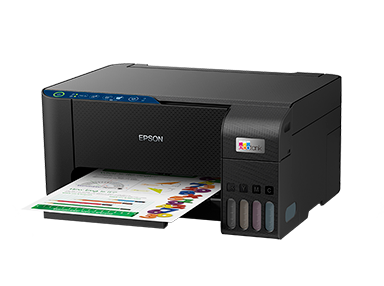
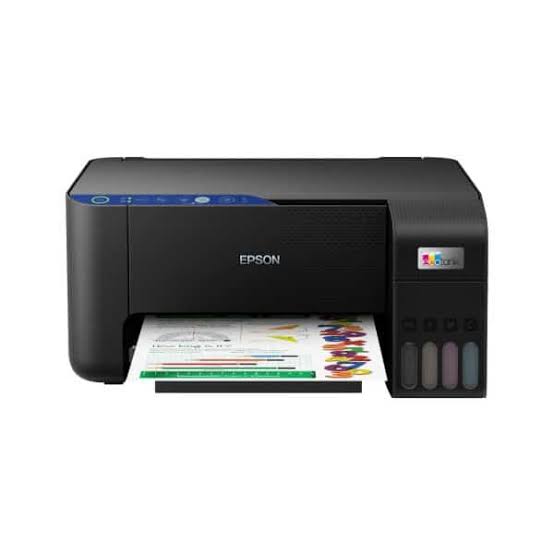
Some printers are built to impress on a spec sheet. The Epson L3251 is built to stay out of your way. It handles the printing, scanning and copying that homes and small desks actually need, connects over Wi-Fi, and runs on refillable ink tanks instead of cartridges. If you want a printer you set up once and then rarely think about, this is the type of machine it aims to be.
Who the Epson L3251 Suits Best
A family sharing one printer. Parents, kids and guests can each print from their own phone or laptop over the home network. Nobody has to hunt for a USB cable.
Students. Assignments, lecture notes, project posters and ID photos all print at home, and the scanner turns certificates and forms into files you can email.
Home-based sellers and freelancers. Order slips, invoices, delivery labels and price lists are the kind of paperwork where per-page cost adds up fast. Refillable tanks keep it in check.
Anyone replacing a cartridge printer. If you’ve ever found a cartridge empty on the day you needed to print, the tank system removes that surprise. The ink level is visible from the outside.
How Wireless Printing Works on the L3251
The printer supports Wi-Fi (802.11b/g/n) and Wi-Fi Direct. The first lets it share your home or office network. The second lets a phone or laptop talk to it directly, which helps in places with no router or a weak signal.
Setup runs through the Epson Smart Panel app, a free tool that guides you through connecting to Wi-Fi, then lets you print, scan and check ink levels from your handset. You can find it on the App Store and Google Play. Epson Connect adds extras such as Email Print, where you send a document to the printer’s email address, and a Remote Print Driver. The full spec list is on Epson’s L3251 product page.
Ink, Speed and Print Quality
The L3251 takes Epson 103 ink bottles in black, cyan, magenta and yellow. Replacement bottles are rated for roughly 4,500 black pages and up to 7,500 colour pages. These are Epson’s test-pattern estimates, so real results depend on what you print.
Speed is modest. Epson’s ISO rating is about 10 pages per minute in black and 5 in colour. Draft mode climbs to 33 and 15, but that sacrifices quality. A 4 x 6 inch photo takes around 69 seconds. Resolution tops out at 5,760 x 1,440 dpi with a 3-picolitre minimum droplet, and the dye ink gives bright colour on both documents and photos. It prints borderless up to 4R.
On the scanning side, the flatbed scanner (CIS sensor) reaches 1,200 x 2,400 dpi optical resolution. An A4 page at 200 dpi takes about 11 seconds in black and 28 seconds in colour.
Key Specifications
- Functions: print, scan, copy
- Print method: Epson Micro Piezo heat-free printhead
- Resolution: 5,760 x 1,440 dpi
- Connectivity: Wi-Fi, Wi-Fi Direct, USB 2.0
- Duplex: manual
- Weight: about 3.9 kg
- Power: AC 220–240V
- Interface: LED status lights, no colour screen
- Not included: automatic document feeder, fax
Common Questions About the Epson L3251
Can I print from my phone?
Yes. Use the Epson Smart Panel app over Wi-Fi, or connect directly through Wi-Fi Direct.
Does it print double-sided automatically?
No. Duplex is manual, so you flip the pages yourself when prompted.
Which ink does it use?
Epson 103 EcoTank bottles. Using the correct bottle for each colour keeps the tanks clean.
Is it good for lots of scanning?
It’s fine for occasional pages. Without an automatic document feeder, each sheet goes on the glass by hand, so busy offices may prefer a model with a feeder.
What’s the difference between the L3251 and the L3252?
They share the same specs and ink. The L3252 is a different regional version, so check the product code on the box.
Final Thoughts
The Epson L3251 is a plain, dependable choice for people who print regularly at home and want wireless convenience without cartridge costs. It won’t win any speed contests and it skips office features like a document feeder, but for homework, household paperwork and small business forms, it covers the essentials.




 Boda delivery

 Boda delivery
 Countrywide delivery
 Warranty 1 year
 Free 30 days Returns




Reviews
Clear filtersThere are no reviews yet.