Epson L3252: From Box to First Print
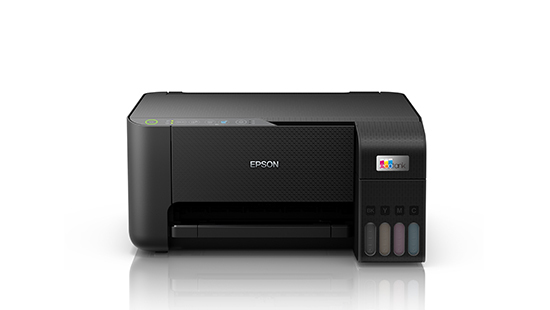
Buying a printer is the easy part. What people worry about is getting it running and keeping it running. The Epson L3252 is an A4 ink tank all-in-one with Wi-Fi Direct, and it’s designed to make both stages simple. This guide covers what’s in the box, how setup works, how refilling goes, and where the printer’s limits are, so you know what to expect before the first page comes out.
What Comes in the Box
Expect the printer itself, a power cable, a setup guide, a warranty document, a driver CD and four 65 ml bottles of Epson 103 ink in black, cyan, magenta and yellow. Packs can differ slightly between regions, so check the contents against the printed list on your carton. The printer comes in black and weighs about 3.9 kg, which makes it easy to carry from room to room.
Setting Up in Five Steps
- Unpack and remove all tape. Peel the protective tape from the body and open the scanner lid to check for packing material.
- Fill the tanks. Lift the tank cover and match each bottle to its colour. The bottle necks are keyed so that only the correct colour fits its tank. Let each bottle drain on its own without squeezing it.
- Power on and wait. The printer moves ink into the printhead, which takes several minutes. Don’t switch it off during this stage.
- Connect your device. Install the free Epson Smart Panel app from the App Store or Google Play. It guides you through joining your Wi-Fi network. You can check which printers the app supports on Epson’s compatibility guide.
- Print a test page. Run a nozzle check or a short document to confirm the colours come out cleanly.
Printing from Phones and Laptops
The L3252 supports Wi-Fi (802.11b/g/n) and Wi-Fi Direct. Standard Wi-Fi puts the printer on your home or office network, while Wi-Fi Direct lets a phone or laptop connect to the printer itself with no router involved. That’s useful in a shop or a rural home where the internet connection comes and goes.
Beyond the app, Epson Connect services add Email Print, which lets you send a document to the printer’s email address, and a Remote Print Driver for printing over the internet. Epson lists driver support for Windows and macOS, so check Epson’s driver downloads for your exact operating system version.
Refilling and Keeping Costs Down
The L3252 uses Epson 103 EcoTank bottles. A replacement set is rated for roughly 4,500 black pages and up to 7,500 colour pages. These are test-pattern figures, so your actual numbers will vary with what you print.
A few habits help the ink go further. Top up a tank before it runs very low. Use genuine Epson bottles, since the printer is tuned for them. Print something now and then, even a colour test page, so the nozzles don’t dry out during long idle periods. When the maintenance box that collects waste ink fills up, replace it as the printer prompts you.
Specifications at a Glance
| Feature |
Epson L3252 |
| Functions |
Print, scan, copy |
| Print method |
Epson Micro Piezo heat-free printhead |
| Resolution |
5,760 x 1,440 dpi, 3 pl minimum droplet |
| Speed (draft, A4) |
Up to 33 ppm black / 15 ppm colour |
| Speed (ISO) |
About 10 ipm black / 5 ipm colour |
| Scanner |
Flatbed CIS, up to 1,200 x 2,400 dpi |
| Scan time (A4, 200 dpi) |
About 11 sec black / 28 sec colour |
| Connectivity |
Wi-Fi, Wi-Fi Direct, USB |
| Ink |
Epson 103 dye ink, 4 colours |
| Size (W x D x H) |
About 375 x 347 x 179 mm |
| Weight |
About 3.9 kg |
Limits Worth Knowing
The L3252 keeps things simple, which means a few trade-offs. There is no automatic document feeder, so every scan or copy means placing one page on the glass. There is no fax and no colour screen, so you rely on the buttons, indicator lights and your phone. Double-sided printing is manual. The ISO speed is modest, so it suits homework, forms and everyday documents better than big print runs.
Is the Epson L3252 Right for You?
If you print regularly at home or from a small desk and want low running costs with wireless convenience, the Epson L3252 is a practical choice. Setup takes a few minutes, and refilling is clean. If you scan stacks of documents or print hundreds of pages at a time, a model with a document feeder and faster speeds would suit you better.



 Boda delivery

 Boda delivery
 Countrywide delivery
 Warranty 1 year
 Free 30 days Returns




Reviews
Clear filtersThere are no reviews yet.