Epson L4360: The Duplex Ink Tank Printer for Busy Desks
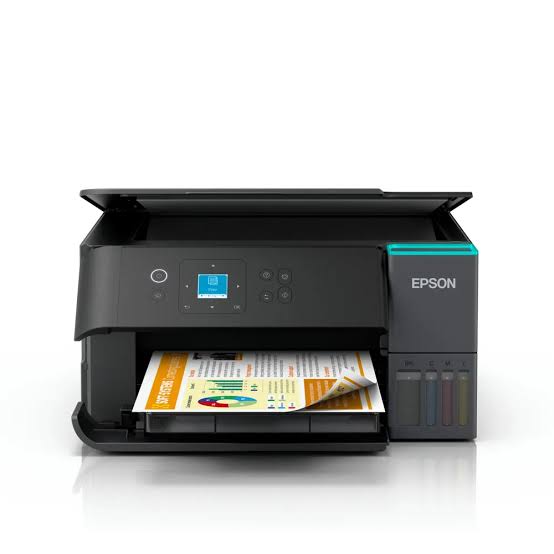
If your printing involves reports, statements, contracts or school packs, you already know that single-sided output wastes paper and time. The Epson L4360 is built for that kind of workload. It prints on both sides of the page automatically, shows its status on a small colour screen, and runs on refillable ink tanks, so each page stays cheap. It sits a step above entry-level EcoTank models, and this article explains what that extra step gets you.
What Sets the Epson L4360 Apart
Automatic Double-Sided Printing
Most entry-level ink tank printers leave duplexing to you: print the odd pages, flip the stack, print the rest. The L4360 does it by itself, which saves paper and avoids page-order mistakes. Double-sided speed is lower than single-sided, with Epson quoting about 6.5 ipm in black and 4.5 ipm in colour. Even so, for a 20-page report you’d otherwise flip by hand, the time saving is real.
A Newer Printhead
The L4360 uses Epson’s PrecisionCore heat-free printhead, which Epson credits with sharper output and lower power consumption. Resolution reaches 4,800 x 1,200 dpi, and Epson quotes a first page out in about 9 seconds in black on single-sided jobs.
A Screen You’ll Actually Use
A 1.44-inch colour LCD lets you check status, adjust settings and start copies at the printer itself, without opening a laptop or an app.
How Fast Is It in Practice?
Draft mode reaches 33 pages per minute in black and 20 in colour, but those numbers come from low-quality output. The ISO ratings are a better guide: about 15 ipm in black and 8 ipm in colour for single-sided pages. A 4 x 6 inch photo takes roughly 60 seconds with a border and 82 seconds without. Borderless printing goes up to A4, which suits flyers, certificates and school posters.
Wireless Printing and Software
The printer supports Wi-Fi, Wi-Fi Direct, Apple AirPrint, Mopria and Chrome OS, so phones, tablets and laptops can print without special drivers. Wi-Fi Direct lets a device connect straight to the printer when there’s no router. The free Epson Smart Panel app handles setup and everyday tasks, and Epson Connect adds Email Print and remote printing. For desktop use, Epson lists Photo+, ScanSmart, Device Admin and Remote Services software. You can see Epson’s own listing on its L4360 product page.
Ink and Running Costs
Epson rates the black bottle at up to 8,500 pages, with colour around 6,500 pages, in figures published for some models. The bottle series differs by region, and Epson’s Middle East and Africa datasheet lists the 101 series, so the yields on the box you receive may differ. The principle is the same either way: you buy ink in bottles, refill the front-facing tanks, and a user-replaceable maintenance box handles waste ink. Because you pay for ink only when you refill, the cost per page stays far below that of a cartridge printer.
Specifications at a Glance
| Feature |
Epson L4360 |
| Functions |
Print, scan, copy |
| Printhead |
PrecisionCore, heat-free |
| Max resolution |
4,800 x 1,200 dpi |
| Speed (ISO, A4) |
15 ipm black / 8 ipm colour |
| Duplex speed |
6.5 ipm black / 4.5 ipm colour |
| Scanner |
Flatbed CIS, up to 1,200 x 2,400 dpi |
| Display |
1.44-inch colour LCD |
| Connectivity |
Wi-Fi, Wi-Fi Direct, USB 2.0 |
| Mobile printing |
Smart Panel, AirPrint, Mopria, Email Print |
| Paper tray |
100 sheets |
Who Should Buy the Epson L4360
It suits home offices, small shops, admin desks and students who print reports, forms and statements every week. Automatic duplex plus a low cost per page makes the most difference for anyone who prints multi-page documents. It’s also a reasonable choice for families who want one printer that can handle both homework and photos.
Who Should Look Elsewhere
The L4360 has no automatic document feeder, so scanning or copying a stack means placing each page on the glass. It also has no fax. If you only print a few pages a month, a simpler entry-level EcoTank will cost less and do the job. And if you scan large batches every day, look at a printer with a feeder.
Common Questions
Does the L4360 print double-sided automatically?
Yes. Duplex printing is built in, with no need to flip pages.
Can I print from my phone without a router?
Yes, through Wi-Fi Direct or the Epson Smart Panel app.
Does it print borderless?
Yes, up to A4 size.
Does it have a fax or document feeder?
No. It handles print, scan and copy only, one sheet at a time on the glass.
Final Verdict
The Epson L4360 adds duplex printing, a newer printhead and a colour screen to the EcoTank formula while keeping running costs low. For busy home offices and small businesses, those upgrades are the reason to pick it over a basic model.



 Boda delivery

 Boda delivery
 Countrywide delivery
 Warranty 1 year
 Free 30 days Returns




Reviews
Clear filtersThere are no reviews yet.