Epson L6370: A Small-Office Workhorse With a Document Feeder
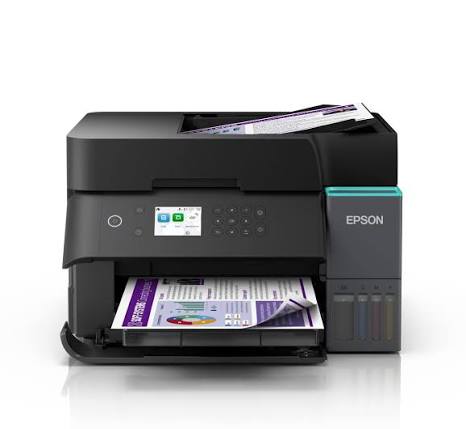
A printer in a small office does far more than print. It scans signed contracts, copies IDs, produces invoices for the afternoon courier and gets used by five people before lunch. The Epson L6370 is aimed at exactly that kind of day. Unlike entry-level EcoTank models, it has an automatic document feeder, automatic two-sided printing and scanning, and a wired Ethernet port, all on top of the refillable ink tanks that keep the cost per page low. Here is how it handles the jobs a busy office throws at it.
The Feeder Changes Everything
The biggest difference between the L6370 and cheaper EcoTank printers is the automatic document feeder (ADF). Instead of lifting the lid and placing each page on the glass, you load up to 30 sheets of A4 and let the printer work through them. The feeder accepts paper from 64 to 95 g/m² and can scan both sides of a page. Epson’s listings quote ADF copy speeds of up to 12 ipm in black for single-sided pages, and about 6 ipm for double-sided. For anyone who handles contracts, statements or client files, this is the feature that saves the most time.
Print Speed and Quality
Printing is a step up as well. Epson rates the L6370 at 18 ipm in black and 9 ipm in colour under ISO testing, with draft speeds of up to 35 and 23 ppm. Automatic duplex printing is built in, so double-sided reports come out without any page flipping. The PrecisionCore printhead reaches 4,800 x 1,200 dpi, and Epson lists a pigment black ink, which suits sharp, smudge-resistant text, with dye inks for colour. Borderless printing goes up to A4, which helps with flyers, certificates and price lists.
Connecting the Whole Office
Where entry-level models rely on Wi-Fi alone, the L6370 offers four ways to connect: USB, Ethernet (10/100 Mbps), Wi-Fi (802.11b/g/n) and Wi-Fi Direct. A wired Ethernet connection gives a shared office printer a steadier link than Wi-Fi, and Wi-Fi Direct lets up to four devices connect without a router.
Mobile printing is well covered. The printer supports Apple AirPrint, Mopria and Chrome OS, and the free Epson Smart Panel app handles setup, printing and troubleshooting. You can install it from the App Store or Google Play, and check supported models on Epson’s compatibility guide. Epson Connect adds Email Print, a Remote Print Driver and Scan to Cloud, so staff can send documents to the printer or save scans online from anywhere. For desktop use, Epson lists Photo+, ScanSmart (handy for turning scans into searchable text), Device Admin and Remote Services.
A Control Panel That Saves Trips to the Computer
A 2.4-inch colour LCD sits on the front, so you can start copies, check ink and change settings at the printer. In a shared office, that means fewer interruptions for whoever owns the computer it’s connected to.
Ink and Running Costs
The L6370 uses refillable ink bottles. In Epson rates black bottle is rated at up to 8,500 pages and each colour bottle at 6,500 pages. Bundled ink is quoted differently, at about 15,100 pages, and the bottle series varies by region, so check your carton for the exact numbers. A user-replaceable maintenance box collects waste ink.
Specifications at a Glance
| Feature |
Epson L6370 |
| Functions |
Print, scan, copy, with ADF |
| Printhead |
PrecisionCore, heat-free |
| Max resolution |
4,800 x 1,200 dpi |
| Speed (ISO) |
18 ipm black / 9 ipm colour |
| Draft speed |
Up to 35 ppm black / 23 ppm colour |
| Duplex |
Automatic print and scan |
| ADF |
30 sheets A4, 64–95 g/m² |
| Scanner |
Flatbed CIS, up to 1,200 x 2,400 dpi |
| Display |
2.4-inch colour LCD |
| Connectivity |
USB 2.0, Ethernet, Wi-Fi, Wi-Fi Direct |
| Paper sizes |
A4, A5, A6, B5, B6, Letter, Legal |
| Power |
AC 220–240V |
Who the Epson L6370 Is For
It suits small offices, clinics, schools, accounting desks and home businesses that handle paperwork every day. If you regularly scan or copy multi-page documents, the feeder pays for itself in saved time. If several people share one printer, Ethernet plus Wi-Fi keeps everyone connected. And if you print double-sided reports or statements, built-in duplex cuts paper use.
What It Doesn’t Do
The L6370 is a 3-in-1 machine, so fax isn’t part of the package. The feeder holds 30 sheets, so very large scan batches mean loading in stages. It also costs more up front than basic EcoTank models, so if you print a few pages a week and never scan stacks, a simpler printer will do the job.
Common Questions
Does it scan both sides automatically?
Yes. Epson lists duplex scanning through the feeder.
Can I connect it by cable to a network?
Yes. It has an Ethernet port as well as Wi-Fi and USB.
Can I print from my phone?
Yes, through the Epson Smart Panel app, AirPrint or Mopria.
Does it print borderless?
Yes, up to A4.
Final Verdict
The Epson L6370 takes the low-cost EcoTank idea and adds the features offices rely on: a feeder, duplex scanning, Ethernet and faster printing. If your daily work involves stacks of paper, those extras make it a better fit than a basic home model.



 Boda delivery

 Boda delivery
 Countrywide delivery
 Warranty 1 year
 Free 30 days Returns




Reviews
Clear filtersThere are no reviews yet.