Epson L6390: A 4-in-1 Office Printer With Fax, Feeder and Duplex
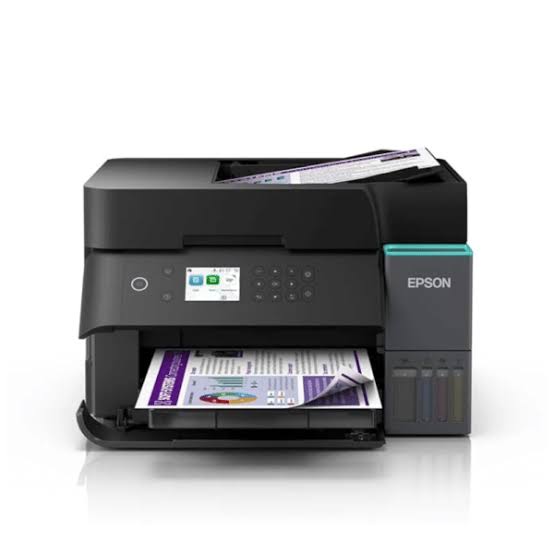
Some offices still run on paper. Contracts get signed, delivery notes get stamped, IDs get copied, and a supplier somewhere still asks for a fax. The Epson L6390 is built for that kind of day. It prints, scans, copies and faxes, with an automatic document feeder, automatic two-sided printing and a wired Ethernet port, all running on refillable ink tanks instead of cartridges. It replaces the L6290, and here is what it brings to a busy desk.
Four Functions in One Machine
The L6390 is a true 4-in-1. Beyond print, scan and copy, it has walk-up black-and-white and colour fax with a 33.6 kbps modem (about 3 seconds a page), 100 pages of memory and 100 speed-dial entries. It also supports PC fax, broadcast fax and delayed sending. If your clients, banks or suppliers still ask for faxed documents, you don’t need a second machine.
The Feeder and Duplex Save the Most Time
Load up to 30 sheets of A4 (or 10 sheets of Legal) into the automatic document feeder and walk away. Epson’s listing gives ADF copy speeds of up to 12 ipm in black and 5 ipm in colour for single-sided pages, and 6 ipm and 3 ipm for double-sided. ADF scanning runs at about 5 ipm single-sided and 3.5 ipm double-sided, and the scanner reads up to 1,200 x 2,400 dpi.
Automatic duplex covers printing, copying and scanning, so double-sided reports and statements need no page flipping. The 250-sheet front paper tray also means fewer refills during a busy morning.
Print Speed and Quality
Epson rates the L6390 at 18 ipm in black and 9 ipm in colour (ISO), with duplex speeds of 6.5 ipm black and 4.5 ipm colour. The PrecisionCore printhead delivers up to 4,800 x 1,200 dpi. It pairs pigment black ink, which suits sharp, smudge-resistant text, with dye colour inks, and it prints borderless. The printhead is heat-free, which Epson says cuts energy use sharply compared with laser machines. You can read more on Epson’s Heat-Free Technology page.
Connectivity for Shared Offices
The L6390 connects by USB, Ethernet, Wi-Fi and Wi-Fi Direct. A wired Ethernet link gives a shared office printer a steadier connection than Wi-Fi alone, so several staff can print without dropouts.
Mobile printing is well covered. The printer works with Apple AirPrint, Mopria and Chrome OS, and the free Epson Smart Panel app handles setup, printing, scanning and ink checks from your phone. Check Epson’s compatibility list before installing. Epson Connect adds Email Print, a Remote Print Driver and Scan to Cloud. On the desktop, Epson lists Photo+, ScanSmart, Device Admin and Remote Services. The 2.4-inch colour touchscreen lets you start copies, send faxes and change settings without going to a computer. Drivers and utilities are in Epson’s download centre, and the setup guide walks you through installation.
Ink and Running Costs
Refillable bottles replace cartridges. Epson says the bundled ink is good for about 15,100 black pages and 5,500 colour pages. The box holds one 127 ml black bottle, three 70 ml colour bottles and an extra black bottle. Yields are extrapolated from Epson’s test patterns, and the first fill uses some ink to prime the printhead, so real-world results vary. Epson also claims up to 90% lower ink costs than comparable cartridge and laser machines. A replaceable maintenance box collects waste ink.
Specifications at a Glance
| Feature |
Epson L6390 |
| Functions |
Print, scan, copy, fax |
| Printhead |
PrecisionCore, heat-free |
| Max resolution |
4,800 x 1,200 dpi |
| Speed (ISO) |
18 ipm black / 9 ipm colour |
| Duplex print speed |
6.5 ipm black / 4.5 ipm colour |
| Duplex |
Automatic print, copy and scan |
| ADF |
30 sheets A4, 10 sheets Legal |
| Paper tray |
250 sheets |
| Scanner |
CIS, up to 1,200 x 2,400 dpi |
| Fax |
33.6 kbps, 100-page memory, PC fax |
| Display |
2.4-inch colour touchscreen |
| Connectivity |
USB, Ethernet, Wi-Fi, Wi-Fi Direct |
| Size and weight |
375 x 347 x 240 mm, about 7.3 kg |
| Power |
AC 220-240V |
Who the Epson L6390 Is For
It suits small offices, law and accounting desks, clinics, schools and home businesses that move paper every day. If you scan multi-page documents, the feeder pays for itself. If several people share one printer, Ethernet plus Wi-Fi keeps everyone connected. And if you send or receive faxes, you get that built in.
What It Doesn’t Do
The L6390 tops out at A4, so it won’t handle A3 jobs. The feeder holds 30 sheets, so large scan batches mean loading in stages. It also costs more than basic EcoTank models, so if you print a few pages a week and never fax or scan stacks, a simpler printer will do.
Common Questions
Does the Epson L6390 have fax? Yes. It sends and receives black-and-white and colour faxes.
Does it scan both sides automatically? Yes, through the feeder.
Can I connect it to my office network by cable? Yes, it has an Ethernet port as well as Wi-Fi and USB.
Can I print from my phone? Yes, through Epson Smart Panel, AirPrint or Mopria.
Final Verdict
The Epson L6390 takes the low-cost EcoTank idea and adds what offices rely on: a feeder, duplex, Ethernet and fax. If your day involves stacks of paper, it’s a better fit than a basic home model.



 Boda delivery







Reviews
Clear filtersThere are no reviews yet.