Canon CanoScan LiDE 400
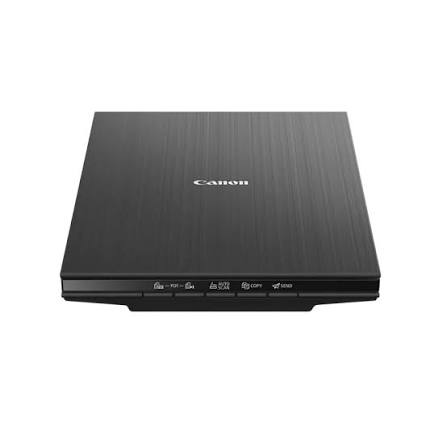
The Canon CanoScan LiDE 400 is a premium A4 flatbed scanner built for speed and sharpness. It captures photos and documents at 4800 x 4800 dpi optical resolution. Moreover, one USB Type-C cable supplies both power and data. As a result, your desk stays tidy and your workflow stays quick.
Canon paired high resolution with a space-saving upright option. Therefore, the scanner fits homes, studios, and compact offices. Furthermore, five EZ buttons simplify routine scanning jobs. Consequently, even first-time users produce professional-looking digital files.
Canon CanoScan LiDE 400 Precision at 4800 dpi
Optical resolution reaches 4800 x 4800 dpi. Therefore, enlarged prints keep fine textures and delicate edges. Additionally, selectable resolution ranges from 25 to 19200 dpi. Consequently, you choose the right balance between detail and file size.
A CIS sensor and three-colour RGB LED light source drive image capture. Moreover, colour scans process 48-bit input for rich tonal depth. Meanwhile, greyscale scans use 16-bit input and 8-bit output. Hence, black-and-white archives keep subtle shading.
Smart Image Corrections
Auto Document Fix sharpens and clarifies printed pages. Similarly, Auto Photo Fix improves faded colours and uneven exposure. Therefore, vintage photographs look fresher straight from the glass. Additionally, Auto Scan detects the original and applies suitable settings.
Quick Turnaround for Large Scanning Projects
An A4 colour page at 300 dpi takes about 8 seconds. Likewise, a 4 x 6 inch photo needs only about 4 seconds. Furthermore, previews appear in around 7 seconds. As a result, long projects move forward without frustrating pauses.
Line speed also impresses at high resolution. For instance, colour scanning at 4800 dpi runs at 25.4 milliseconds per line. Meanwhile, greyscale scanning at the same setting runs at 8.2 milliseconds per line.
Five EZ Buttons for Faster Workflows
Dedicated buttons cover Auto Scan, Copy, Send, and two PDF functions. Therefore, you launch common tasks with a single press. Moreover, the second PDF button completes multi-page documents. As a result, contracts and reports finish as one tidy file.
Scan to Cloud and Email
Scan to cloud support speeds up digital sharing. Additionally, the Send button prepares files for email delivery. Consequently, you can forward results to colleagues within moments. Likewise, relatives receive scanned photos without waiting for postal delivery.
Upright Scanning That Saves Desk Space
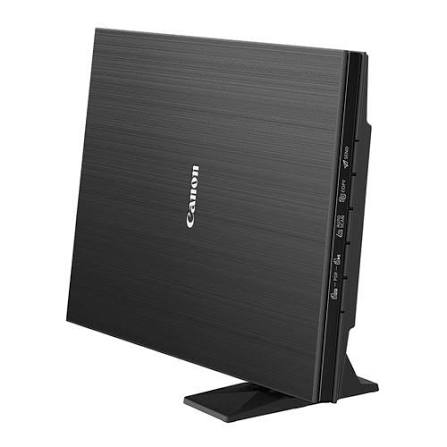
A clip-on vertical stand lets the scanner stand upright. Therefore, it occupies a narrow strip of your desk. Moreover, upright storage keeps the glass safe from dust and clutter. Meanwhile, the stand ships in the box.
Z-Lid for Thick Originals
The double-hinge Z-Lid adapts to bulky originals. Specifically, books and files up to 21 mm thick press flat. Consequently, spine shadows and page curl shrink noticeably. Thus, cookbooks and yearbooks scan with fewer distortions.
Modern USB-C Connectivity
A single USB Type-C port handles power and data. Furthermore, the interface works with USB 3.0 and 2.0 ports. Therefore, newer and older computers connect without extra hardware. Moreover, modern Desktops and slim notebooks pair well with this connection.
Power consumption stays modest at about 4.5 W during operation. Meanwhile, standby draw falls to roughly 0.3 W. Therefore, leaving the scanner connected uses very little power.
Everyday Reliability in a Slim Frame
Consistent results matter for long scanning sessions. Therefore, the LiDE 400 pairs a stable flatbed design with automatic corrections. Moreover, its light body moves easily between rooms. In addition, the minimal control layout keeps training time low. Overall, the scanner delivers dependable results with very little fuss.
Technical Specifications
Image Capture
The LiDE 400 is a flatbed scanner with a CIS element. It uses a three-colour RGB LED light source. Moreover, optical resolution reaches 4800 x 4800 dpi. Selectable resolution runs from 25 to 19200 dpi. Additionally, colour scanning offers 48-bit input and 48 or 24-bit output. Greyscale scanning offers 16-bit input and 8-bit output.
Maximum document size is A4 or Letter, at 216 x 297 mm. Furthermore, A4 colour scans at 300 dpi take about 8 seconds. Photos sized 4 x 6 inches take about 4 seconds. Preview speed measures about 7 seconds.
Controls and Interface
Five EZ buttons provide two PDF functions, Auto Scan, Copy, and Send. In addition, the interface is USB Type-C with USB 3.0 and 2.0 compatibility. Scan to cloud, Auto Document Fix, and Auto Photo Fix come standard. Furthermore, bundled software includes Scan Gear and Scan Utility for Windows.
Dimensions, Power, and Contents
The scanner measures about 250 x 367 x 42 mm. It weighs approximately 1.7 kg. Moreover, power draw reaches about 4.5 W in operation and 0.3 W in standby. Operating temperatures run from 5 to 35 degrees Celsius. Humidity should stay between 10 and 90 percent without condensation. The package includes the scanner, a USB cable, manuals, and a vertical stand.
Readers can explore Canon’s wider imaging range on the official Canon website. Meanwhile, these figures reflect published manufacturer details.
Canon CanoScan LiDE 400 Use Cases for Home and Business
Photo Restoration Projects
Photo enthusiasts digitise decades of prints and keepsakes. Therefore, high resolution supports careful retouching and large reprints. Additionally, Auto Photo Fix reduces the editing effort on faded images.
Digital Archives and Records
Families and businesses accumulate stacks of paper records. Consequently, scanning them frees physical space and speeds up searches. Moreover, large digital files need reliable Storage for safe keeping. Hence, many users pair scanners with external drives or network storage.
Home Offices and Study Spaces
Remote workers scan invoices, forms, and signed agreements regularly. Likewise, students digitise lecture notes and library handouts. Furthermore, the Copy button works with compatible Printers for quick duplicates.
Studios, Libraries, and Collectors
Collectors catalogue stamps, cards, and documents in detail. Meanwhile, libraries digitise rare pages with gentle, glass-based handling. Therefore, fragile originals avoid roller damage entirely. In addition, the Z-Lid supports thick albums and bound volumes.
Canon CanoScan LiDE 400 Compatibility and Software
Bundled Scan Gear and Scan Utility support Windows computers. Moreover, Canon lists driver support for selected macOS versions. Therefore, check Canon’s driver pages for your exact operating system. Additionally, the USB Type-C connection suits current laptops and desktops.
Scanned files flow into photo editors and document tools easily. Furthermore, PDF output opens on phones, tablets, and computers. Consequently, shared files rarely need conversion.
Standards That Earn Customer Trust
Quality standards matter when you choose a scanner for precious originals. Therefore, we source each unit carefully through trusted channels. Aiconic Computers stands behind product quality fully. As a result, the LiDE 400 reaches you in dependable condition. Moreover, its sensor, LED light source, and EZ buttons reflect Canon’s manufacturing standards. Additionally, we ensure customers receive their products promptly. Consequently, your photo and document projects start without delay.




 Boda delivery







Reviews
Clear filtersThere are no reviews yet.