Canon PIXMA G3470 Printer
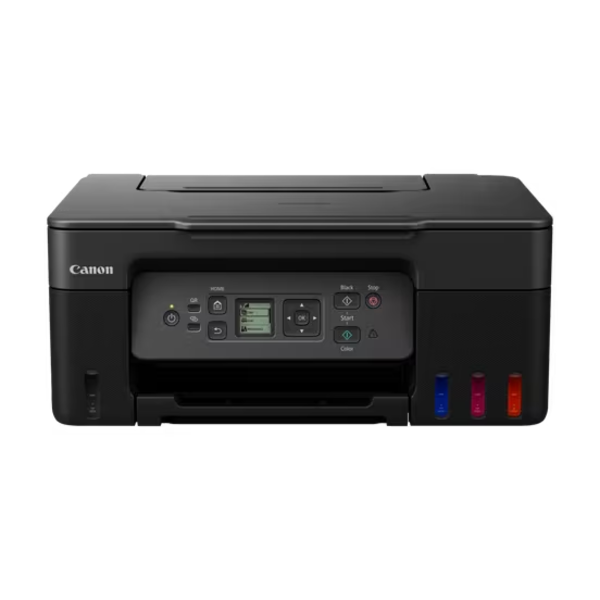
The Canon PIXMA G3470 Printer combines refillable ink tanks with print, copy, and scan functions. Families and small teams gain a steady workhorse for daily paperwork. Moreover, built-in wireless access keeps setup simple and cable-free. Therefore, everyone at home or in the office can print from personal devices. If you explore wider Printers, this ink tank model stands out.
Canon engineered this model for high-volume everyday printing. In addition, its bottle-fed system keeps refills clean and straightforward. Furthermore, the compact body fits shelves, desks, and study corners. As a result, it suits modest spaces without sacrificing capability.
Canon PIXMA G3470 Printer Ink Tank Efficiency
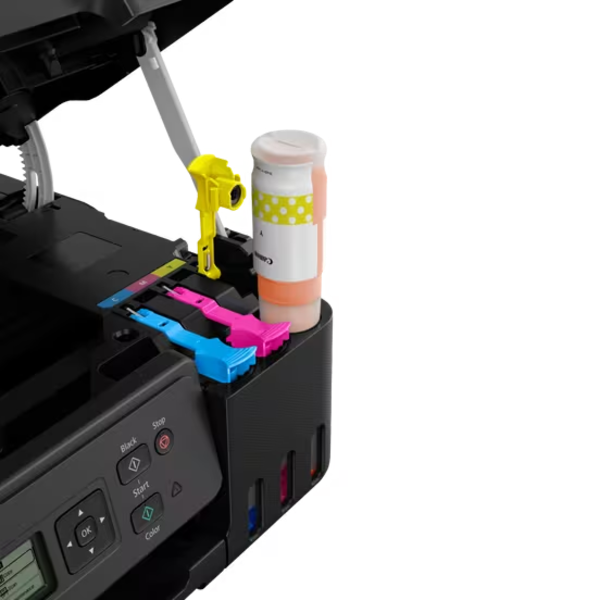
Refillable tanks change how people think about printing. Instead of swapping small cartridges, you pour ink from Canon GI-41 bottles. Consequently, refilling takes moments and avoids frequent interruptions. Moreover, clear tank access helps you monitor your ink supply.
Included bottles deliver generous output from day one. For example, the black bottle yields up to 6,000 pages. Meanwhile, each colour bottle yields up to 7,700 pages. Therefore, heavy document schedules rarely stop for supply changes. Additionally, a user-replaceable maintenance cartridge handles waste ink.
Refilling Made Simple
Four dedicated bottles cover black, cyan, magenta, and yellow. Besides that, colour-coded bottles help prevent refill mistakes. As a result, even first-time users refill with confidence. Furthermore, the printer needs no complicated tools for this process.
Speed and Print Quality for Daily Workloads
Everyday documents come out at about 11 images per minute in mono. Meanwhile, colour pages arrive at about 6 images per minute. Therefore, homework, forms, and reports move through the tray briskly. Additionally, print resolution reaches 4800 x 1200 dpi. Consequently, text looks sharp and graphics keep fine detail.
Plain paper handles most routine jobs well. However, photo paper shows off the richer colour range. Likewise, the printer accepts banner media for oversized displays. Hence, one device covers both office and creative projects.
Canon PIXMA G3470 Printer Photos, Banners, and Borderless Prints
Borderless printing removes white margins from photos and posters. As a result, family pictures look polished edge to edge. Moreover, the printer produces banners up to 1.2 metres long. Therefore, you can create welcome signs and event displays at home. Additionally, manual duplex printing lets you use both sides of a sheet.
Wireless Printing From Every Device
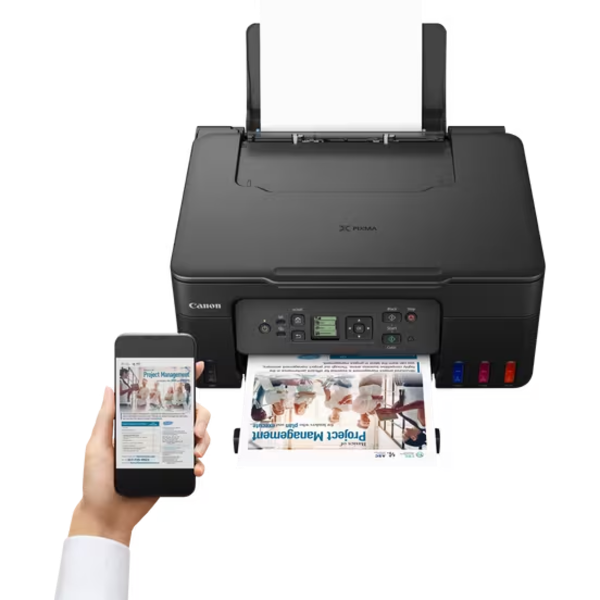
Wi-Fi support frees the printer from your desk. Therefore, you can place it in any room with a power outlet. Additionally, Wireless Direct creates a direct link without a router. Consequently, visitors print files without joining your main network. A Hi-Speed USB port remains available for direct computer connections.
Setup takes only a few minutes. First, connect the printer to your Wi-Fi network. Next, install the Canon PRINT app on your phone. Then, add the printer and start printing. Finally, repeat the process for other household devices.
Mobile Apps and Cloud Link
The Canon PRINT app brings printing controls to your phone. Furthermore, PIXMA Cloud Link lets you print from online accounts. For instance, you can send documents without opening a computer. Android users also gain the Canon Print Service Plugin and Mopria support. Meanwhile, Apple users print through AirPrint.
Handheld devices make this workflow natural. Whether you use phones or Tablets, wireless printing takes only a few taps. Therefore, school and office documents never wait for a desktop.
Smart Design for Easy Daily Use
A compact frame fits comfortably on shelves and narrow desks. Moreover, the 1.3 inch LCD keeps basic settings simple. Therefore, new users learn the controls within minutes. In addition, the rear paper tray loads quickly. Consequently, refilling paper rarely slows a busy workflow.
Copying also stays straightforward. For instance, you place a page on the glass and press start. Meanwhile, scanning digitises records for storage and sharing. Thus, one machine replaces several single-purpose devices.
Technical Specifications Overview
Print, Copy, and Paper Handling
The G3470 is an A4 all-in-one inkjet that prints, copies, and scans. It uses a MegaTank continuous ink supply system. Moreover, maximum print resolution reaches 4800 x 1200 dpi. Print speed measures approximately 11 ipm in mono and 6 ipm in colour. Additionally, borderless printing and banners up to 1.2 metres work as standard.
A 100-sheet rear tray feeds plain paper, photo paper, and banner media. Furthermore, duplex printing runs manually. Therefore, users flip pages themselves for double-sided output.
Connectivity and Control
Connectivity includes Hi-Speed USB Type-B and wireless 802.11b/g/n. In addition, Wireless Direct, AirPrint, and Mopria expand mobile options. A 1.3 inch monochrome LCD handles on-device menus. Moreover, the Canon PRINT app and PIXMA Cloud Link extend control. The Canon Print Service Plugin supports Android printing as well.
Ink and Supplies
The printer uses Canon GI-41 bottles in black, cyan, magenta, and yellow. Additionally, the black bottle yields up to 6,000 pages. Each colour bottle yields up to 7,700 pages. Furthermore, a user-replaceable maintenance cartridge manages waste ink. Canon also offers the printer in black, white, and red finishes.
Readers can explore Canon’s wider imaging range on the official Canon website. Meanwhile, these figures reflect published manufacturer details.
Canon PIXMA G3470 Printer Use Cases at Home and Work
Students and Study Groups
Students print assignments, notes, and research papers constantly. Therefore, a low-interruption ink supply keeps deadlines manageable. Additionally, scanning turns textbook pages into shareable files. Likewise, mobile printing lets students send work straight from their phones.
Busy Family Homes
Families print school forms, recipes, and travel documents regularly. Moreover, photo printing preserves holiday memories on paper. As a result, albums and fridge displays fill up quickly. Furthermore, borderless prints make gifts look thoughtful.
Home Offices and Startups
Remote workers need a dependable all-in-one for daily tasks. For example, they print contracts, scan receipts, and copy identification documents. Additionally, wireless access suits shared workspaces and flexible layouts. Consequently, small teams manage paperwork without extra equipment.
Creative Projects and Community Events
Event organisers and hobbyists often need banners and posters. Therefore, the banner feature adds real flexibility. Meanwhile, high resolution keeps artwork clear and vibrant. In addition, craft makers print templates and labels with ease.
Canon PIXMA G3470 Printer Compatibility Notes
This model supports Windows, macOS, and Chrome OS environments. Therefore, mixed households share one printer easily. Furthermore, Windows users and macOS users both connect through standard wireless setup.
Chromebooks work well for school and light office tasks. Likewise, student and professional Laptops connect over Wi-Fi without cables. Hence, hybrid learners print from any room. Additionally, Android and iOS devices rely on Mopria and AirPrint.
Ink Tank Printing for Heavy Document Loads
Large print volumes demand a system built for endurance. Therefore, high-capacity tanks suit schools, offices, and busy homes. Additionally, printing stays consistent across long jobs. Likewise, text remains legible even on dense spreadsheets. Overall, the system favours steady output over constant maintenance.
Standards That Earn Customer Trust
Quality standards matter when you choose a printer for daily use. Therefore, we source each unit carefully through trusted channels. Aiconic Computers stands behind product quality fully. As a result, the PIXMA G3470 reaches you in dependable condition. Moreover, its ink tank system, scanner, and wireless features reflect Canon’s manufacturing standards. Additionally, we ensure customers receive their products promptly. Consequently, your household or team starts printing without delay.




 Boda delivery

 Boda delivery
 Countrywide delivery
 Warranty 1 year
 Free 48 Hrs Returns




Reviews
Clear filtersThere are no reviews yet.